
PHONE STUDIO is the best place to fix your laptop, iPad and computers. They offer pick up and drop off service. Also they fix my computer and help me recover the information out of it. Highly recommended it.
Computer repair in Courtice.
Bring the tower. We'll trace the fault.
Crashes, no-boot, slow-downs, virus removal and upgrades on desktops, iMacs and custom builds. A new SSD and a clean Windows install can make a five-year-old PC feel new.
5.0 on Google, 320+ reviews
- Free diagnosis
- 90-day warranty, parts and labour
- Same-day repair available
- Walk-ins welcome

From a slow tower to a PC that won't power on
The first step is the same whatever the fault: we find what has failed before we quote a part. A slow tower usually needs an SSD or more RAM. A PC that won't power on needs a look at the PSU (power supply) and the board.
Laptop or MacBook? Screens, batteries, keyboards and hinges are on the Laptop & MacBook repair page.
- 320+ Google reviews
- 9+ Years hands-on experience · Matt, head technician
What we fix on a PC
PC diagnostic
Random crashes, a PC that won't post (it never gets past the first screen), slow boot, blue screens, we trace the cause.
PSU replacement
Dead power supply, random shutoffs under load, no power at all.
SSD upgrade & clone
Faster boots and loads. We migrate your Windows install, so you don't start over.
RAM upgrade
More tabs, smoother video editing, snappier multitasking. Apple Silicon Macs and many thin laptops have memory built onto the board that can't be upgraded, so we check your model first.
GPU install and repair
Graphics card install, driver setup and bench test, plus board-level repair.
Cooling & dust clean
Fans loud, CPU hitting 95°C, gaming throttling. Full clean + thermal repaste.
OS install
Fresh Windows 11 install, drivers, basic apps, your files brought across. Stuck on the Windows logo or locked out of your password? Same job.
Wi-Fi & network card
Wi-Fi or Ethernet stopped working. We test the adapter, drivers and cable, and swap the network card if that's the fault.
Virus & malware
Pop-ups, browser hijacks, ransomware. Full clean + harden the install.
Data transfer
Bringing files, photos and bookmarks across from an old PC to a new one.
Photos, documents and files off a drive or PC that won't boot, including a hard drive that clicks. Hard drive repair is handled as part of recovery. We tell you what's salvageable before any invasive work. No data, no fee on the recovery itself.
Custom build & rebuild
Bring us your parts and we'll assemble and tune it. Or spec one with us.
Cracked laptop screen?
Laptop screens are replaced on the same bench, on Windows laptops and MacBooks: cracked, lined, flickering or black. The Laptop & MacBook repair page covers what a dim display can point to and how the two differ.
From the bench
A graphics card with no power cable to plug in
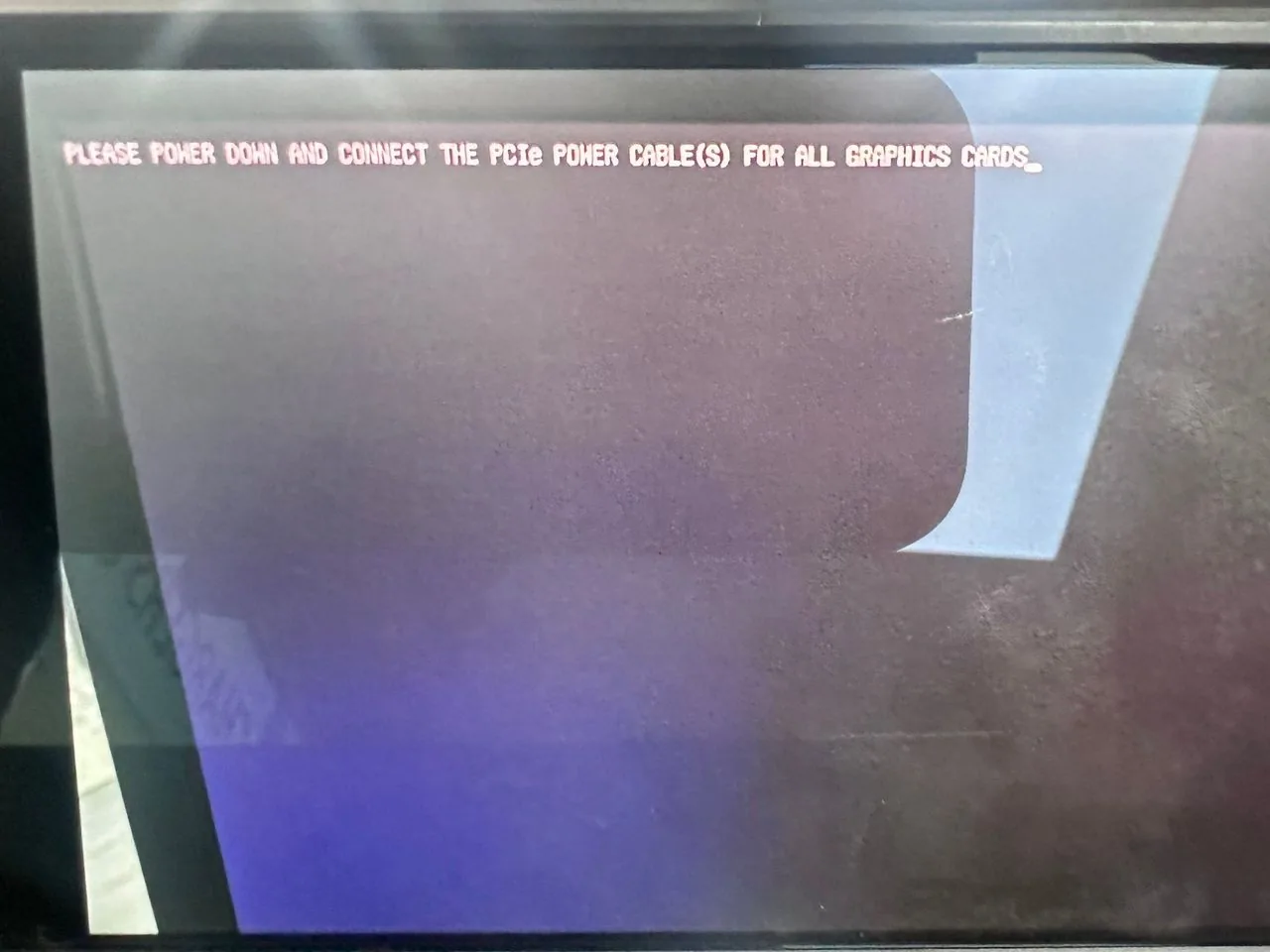
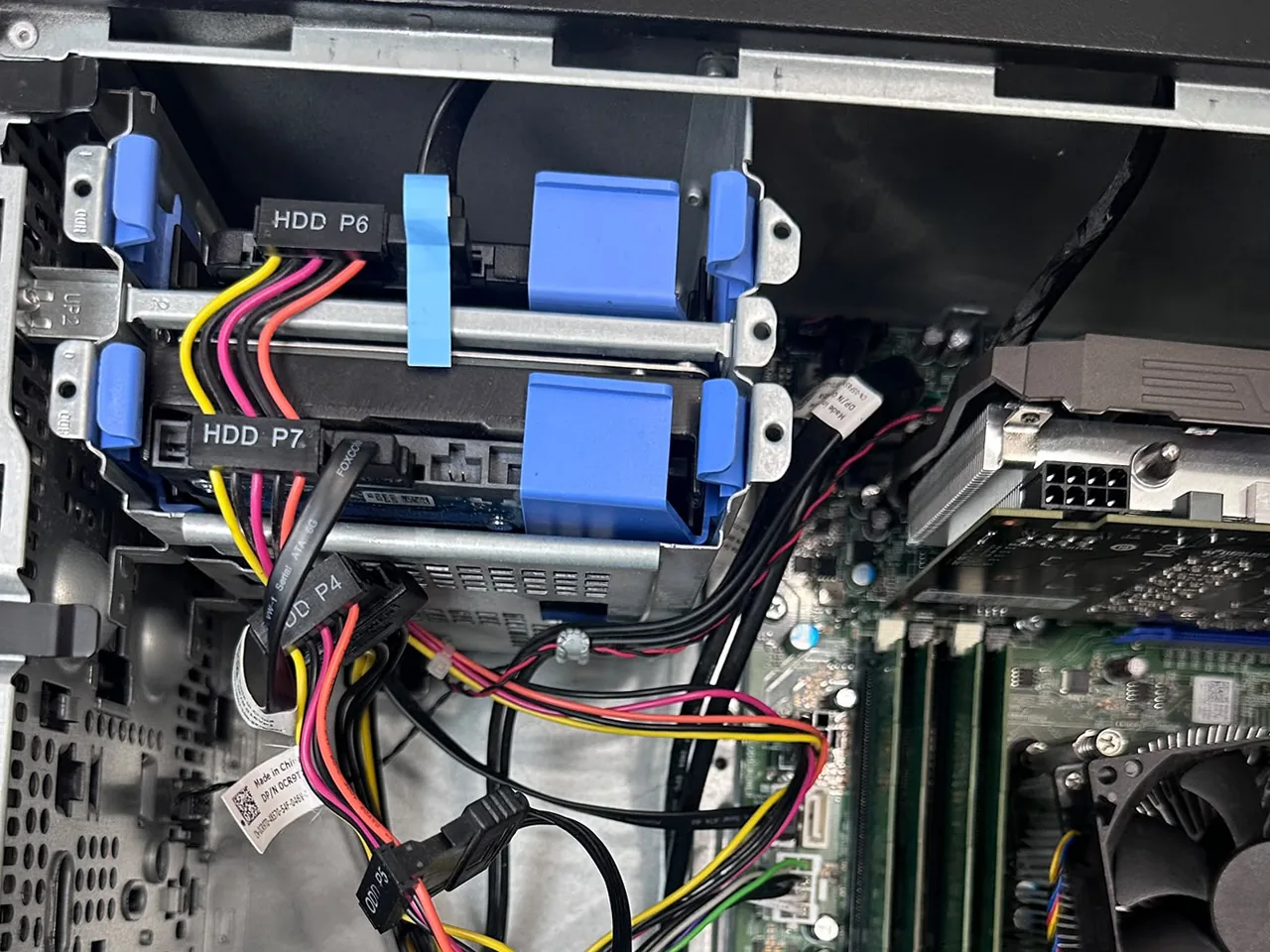
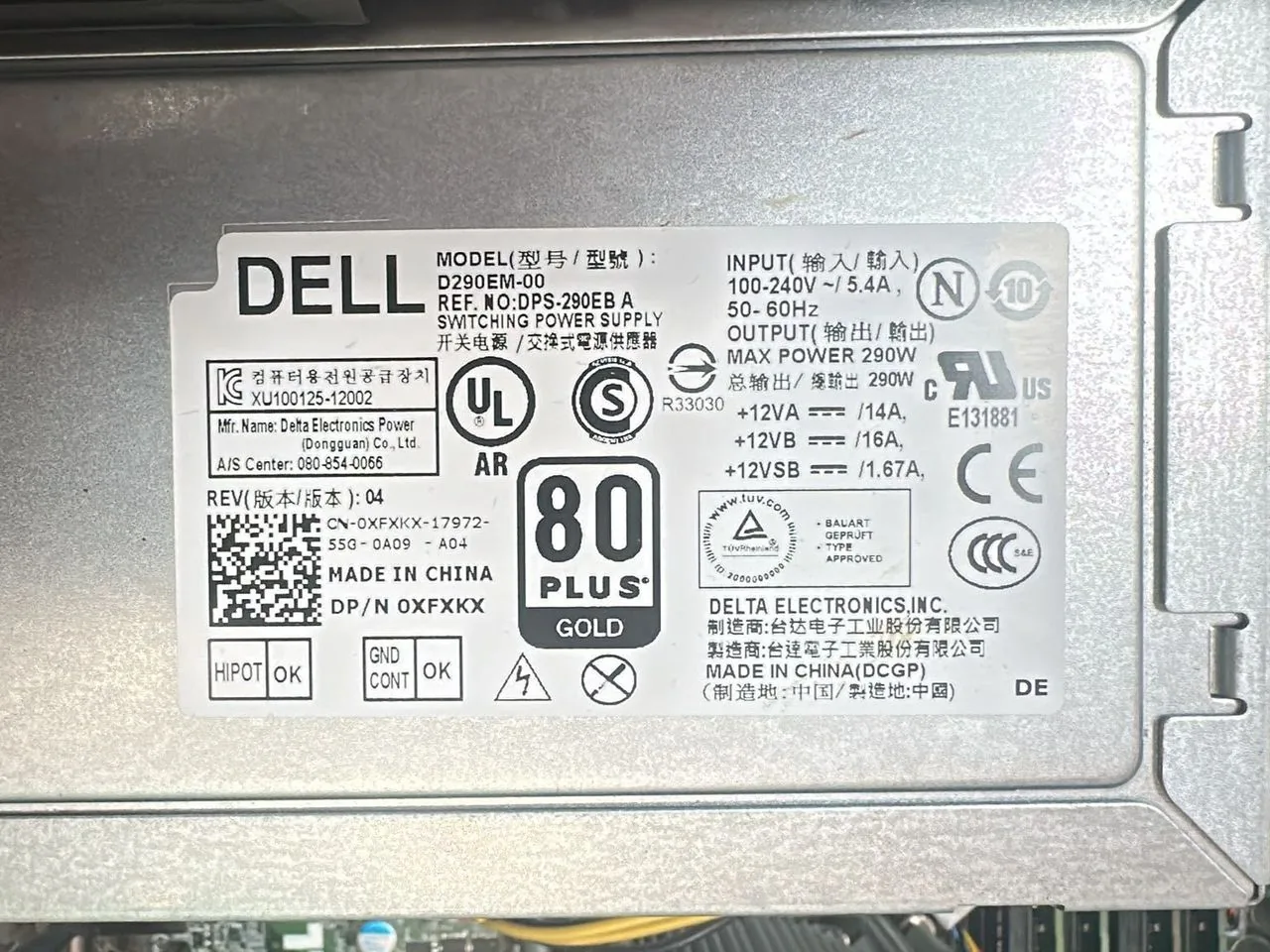
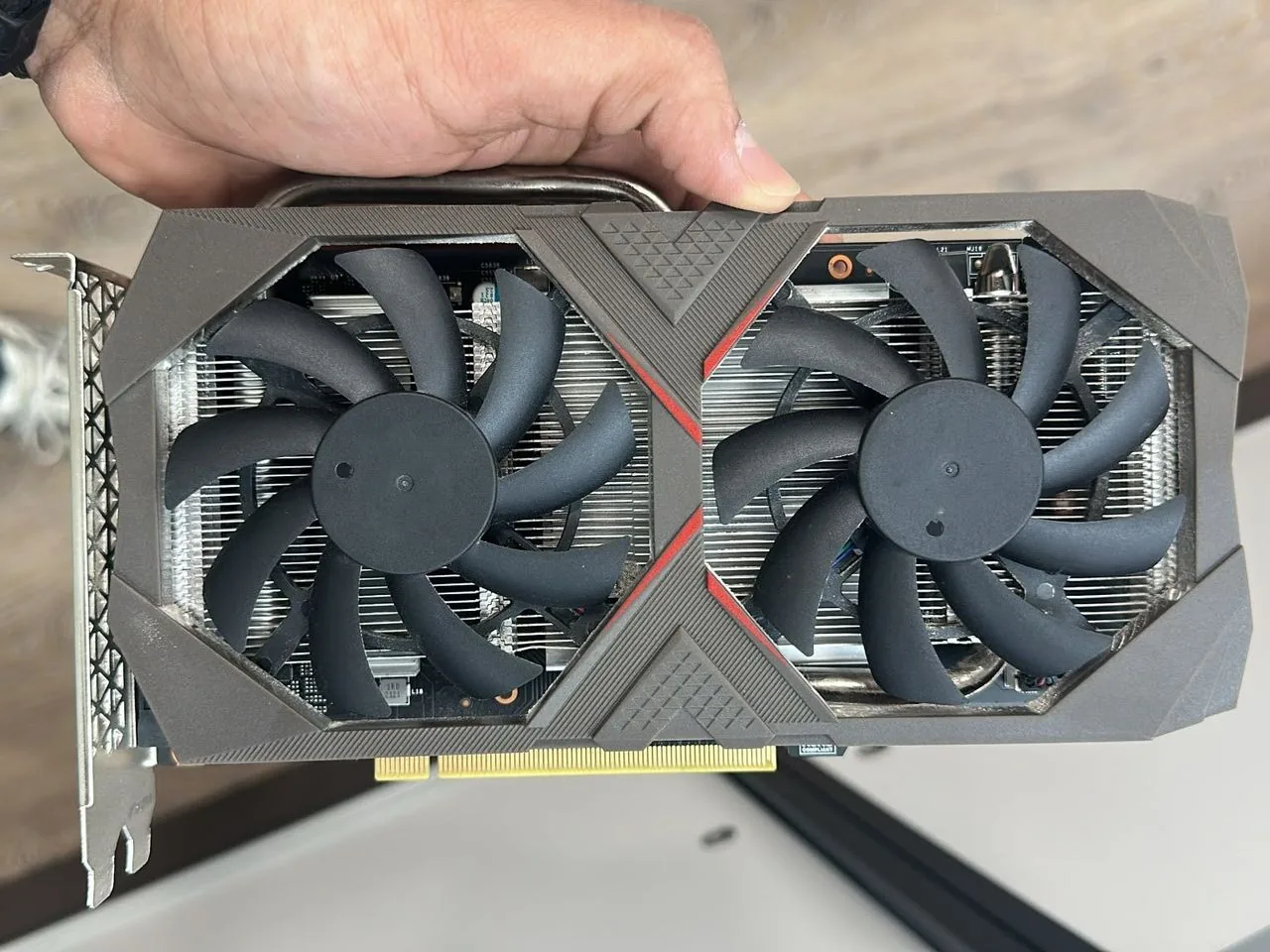
Dell OptiPlex 7020, October 2026. A GTX 1660 Super had been fitted, and the PC stopped on a black screen asking for the PCIe power cable. The stock Dell power supply is 290W and has no PCIe lead for a graphics card. We fitted a bigger power supply with the right cable for the card, and it was ready in 2–3 days. We install and repair graphics cards, board-level when the card needs it.
(full-size photo)
The PC stopped here: connect the PCIe power cable. (full-size photo)
The card's 8-pin power socket, with nothing to plug into it. (full-size photo)
The stock Dell power supply: 290W, no PCIe lead. (full-size photo)
The GTX 1660 Super it had to power.
Won't power on, won't post?
When the fault is on the board.
A PC that won't power on or won't post can be the PSU, the RAM, the BIOS or the motherboard. We check them in turn and trace the fault before we quote anything. Board-level repair is no-fix / no-fee. Routine swaps and upgrades are billed as usual.
- No-boot & board diagnostics
- Won't power on, no display, dead after a power surge. We trace the fault to the board before quoting anything.
- Board-level component repair
- Failed power circuitry and damaged traces repaired on the Courtice bench.
- Graphics cards
- Artifacts, no display, dead after a surge. Free diagnosis, and a clear quote before any work.
- Data recovery from dead drives
- Photos, documents and files pulled off drives and machines that won't boot.
Tell us what the PC does when you press the power button.
Computer repair at the Courtice bench
Walk in, talk to the tech
We're in the plaza at Townline Rd S, just north of Bloor St E in Courtice, with a free parking lot. Bring the tower. Matt or VJ will talk it through at the counter, and you leave knowing what happens next.
- Hard drives other shops gave up on
- “most stores told me they couldn’t extract the information from my damaged hard drive and would give me ridiculously long wait times. VJ at phone studio got it done for me in 3 business days and fixed the issue that so many stores told me couldn’t be done.” Ibtehaj, Sep 2026.
What happens when you bring a computer in
Step 1: Tell us what's wrong
Describe the fault at the counter, or send a photo first.
Step 2: Free diagnosis
We find what has failed before we quote a part.
Step 3: A clear quote before any work
A first quote by phone or photo usually comes within 30 minutes in shop hours; the firm quote follows the diagnosis, and nothing starts until you say yes.
Step 4: We call or text when it's ready
Every repair carries the 90-day warranty, parts and labour.
Desktops and small-form PCs we repair
Desktops
- Dell OptiPlex / Inspiron / XPS
- HP EliteDesk / Pavilion / Omen
- Lenovo ThinkCentre / Legion
- ASUS ROG / TUF
- Custom-built gaming PCs
- Apple iMac / iMac Pro
Small form
- Mac mini (Intel + M-series)
- Intel NUC
- HP Mini PC
- Beelink / Minisforum
What PC and laptop customers say
A handful of recent reviews, straight from the people who walked in with a broken device. 5.0 stars on Google across 320+ reviews.
Coming from another town
Computer repair Whitby, Ontario
We're about 15 minutes (13 km) east of downtown Whitby. Take Highway 401 east to the Bloor St E exit in Oshawa and turn left onto Bloor St E, then turn left onto Townline Rd S. We're at the corner of Glenabbey Dr, just north of Bloor St E.
For a laptop or MacBook, see the Laptop & MacBook repair page.
Visit Phone Studio.
In the plaza at Townline Rd S, just north of Bloor St E. Look for the orange sign. Free parking is right out front.

Hours
- Mon to Fri
- 10:00 AM to 7:00 PM
- Saturday
- 10:00 AM to 6:00 PM
- Sunday
- 11:00 AM to 5:00 PM
courtice@phonestudio.ca
Tell us what your computer's doing. We'll quote it today.
Slow, dead, or full of pop-ups. Describe it and most quotes come back inside 30 minutes during shop hours.
- Free diagnosis
- Written quote before any work
- 90-day warranty, parts and labour.
- Same-day repair available, depending on parts and how busy we are.
Or talk to us now.
Computer repair FAQ
Usually yes, and usually a lot cheaper than replacing the machine. An SSD swap (SATA or NVMe), more RAM and a clean Windows install are the usual steps. We only suggest an upgrade if it makes sense for that PC.
Yes. We repair Windows desktops and laptops from Dell, HP, Lenovo, ASUS, Acer, MSI and Microsoft Surface, custom-built towers and gaming rigs, and Apple iMac and Mac mini. The usual jobs are SSD upgrades, RAM, GPU installs, OS reinstalls, virus removal and full diagnostics. MacBooks and other laptops have their own page, with the same bench behind it.
Yes: a full malware scan, browser cleanup and protection set up going forward. Removing ransomware does not unlock files it has already encrypted, so we tell you what can be recovered. If it's badly infected we recommend a clean install and copy your files off first where the drive allows.
Absolutely. Bring the whole build and any spare parts. We diagnose PSUs, motherboards, RAM compatibility, BIOS issues, and bad cable runs. We don't charge extra because you built it.
Occasionally, we have refurbished desktops on the floor. We can also spec and build a custom PC to your budget; talk to VJ about a quote.
We protect them as far as the drive allows. Before invasive work we check the drive's health and agree a backup plan with you; a failing drive needs careful copying, and we tell you what's at risk. On a Windows reinstall we move your Documents, Pictures and Desktop folders across. Saved browser passwords depend on the browser and its sync settings, so we check that with you first.
Often, yes. Photos, contacts and files can come off a machine that won't power on, and we tell you what's salvageable before any invasive work.
Basic diagnostics often happen within 24–48 hours. A first quote by phone or photo comes within 30 minutes in shop hours; the firm quote follows the free diagnosis. Simple repairs like a power-supply swap or drive replacement may be completed the same day or next day, depending on parts availability and workload. More complex issues can take longer for proper testing.
90-day warranty, parts and labour. Covers defects in the part and our workmanship, not new accidental damage.
For most desktop PC issues you can just bring the tower. If you're having problems specifically with the monitor, keyboard, mouse, or cables, bringing those can help us test.
Yes. This usually points to a failing drive, cable issue, or boot-configuration problem. We can check the drive's health, connections, and settings, then advise on repair or data-recovery options.
Often, yes. Dust in fans and heatsinks, old thermal paste, and poor airflow can cause heat and noise. We can clean the system, refresh thermal paste, and check if any fans or components need replacement.
It can be. Occasional overheating usually just means dust and old thermal paste, but repeated overheating can trip a safety shutdown or damage the power supply or motherboard. We check thermals first, then test the PSU and board if it still won't power on.
Yes. It's usually a driver issue, a failing network card, or a loose cable rather than the whole PC being at fault. We test the adapter, drivers and connections, and can install or swap a network card if needed.
Intermittent issues can be tricky, but we can run tests on memory, drives, power, and temperatures to track down likely causes. Once we find the problem, we explain your options and costs.
Yes. We inspect and repair laptop and desktop boards in-house at the Courtice bench instead of sending them out. If another shop told you it wasn't worth fixing, bring it in and we'll tell you what is economical.
It depends on the fault. Artifacts, no display or a card that died after a surge can come down to a failed part on the board, which we can repair. After the free diagnosis we tell you whether repair or replacement makes more sense, and you get a clear quote before any work.
Yes. We help with home PCs, student computers, and small-business systems. If you manage several office computers, we can discuss repair or upgrade options for multiple devices.
Also on the same bench
- Computer repair OshawaPC, Mac and laptop repair for Oshawa, 9–16 minutes from the Courtice bench.
- Computer repair BowmanvillePC, Mac and laptop repair for Bowmanville, 12–20 minutes west at the Courtice bench.
- Laptop & MacBook repairScreens, batteries, keyboards, hinges, ports, Mac and Windows.
- Data recovery & backupDrives, phones, deleted files and water-damaged devices.
- Micro-soldering & board-level repairDead board, charging IC, backlight, water-damaged logic board, consoles and MacBooks.
- How a computer repair quote is builtWhat decides a computer repair quote, and when a fix is worth it.
- Common laptop problemsWon't power on, slow, overheating, broken hinge: what's fixable and what it costs.
